Configure Agents and Reusable Behaviour
Open Settings → Agents to manage the reusable behavior Reasoning loads: agents, MCP servers, rules, workflows, and skills.
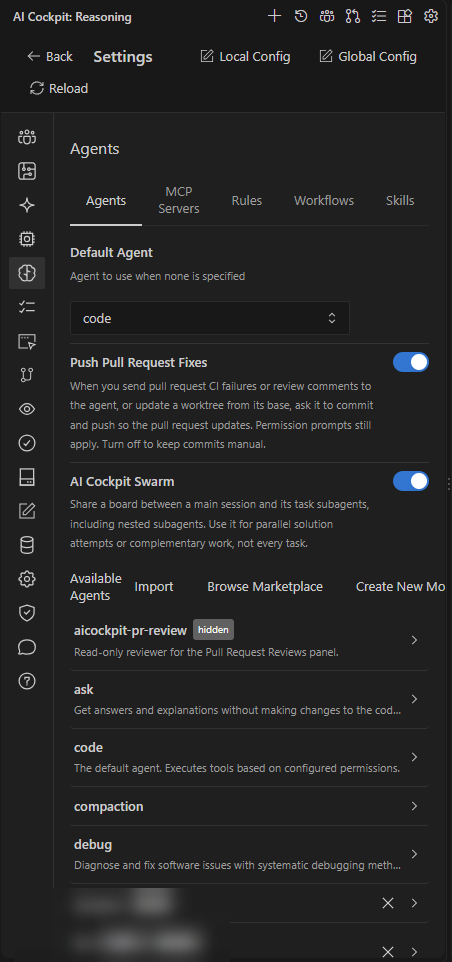
The Agents tab holds the default agent, shared options, and the available agents.
Choose the correct tab
| Tab | Use it to |
|---|---|
| Agents | Inspect, create, import, or edit agents, and choose the Default Agent. |
| MCP Servers | Add and manage connections to external tools and resources, or Browse Marketplace. |
| Rules | Maintain project or global instructions. |
| Workflows | Maintain reusable prompts exposed as slash commands. |
| Skills | Inspect and install reusable capability packages. |
Agent options
The Agents tab also holds options that change how agents work together:
- AI Cockpit Swarm gives a main session and its subagents a shared board. See Work with subagents.
- Push Pull Request Fixes lets the agent commit and push after you send pull request failures or comments from Agent Manager. See Work with pull requests.
- Load Claude Code Files, under Claude Code Compatibility, loads your Claude Code instructions and skills. See Use your Claude Code configuration.
Apply configuration
Use project scope when the behavior belongs to the repository and should be shared with the team. Use global scope for personal behavior that should follow you across projects.
Save changes with the Settings save bar. After changing configuration files outside Settings, type /reload in Chat so Reasoning refreshes agents, MCP servers, rules, workflows, and skills.