Configure Permissions, Auto-Approve, and Sandbox
Control which agent operations need your decision and, where available, what commands can affect.
Set recurring decisions
Open Settings → Auto-Approve. For each tool, such as Read, Edit, Bash, Web Fetch, or Task, choose:
- Allow: runs without asking;
- Ask: shows a permission request in Chat;
- Deny: never runs.
Most tools default to Allow; doom_loop and external_directory default to Ask. You can add patterns to apply a decision only to specific commands or paths. Keep write operations, shell commands, external directories, and network access limited to what your projects need. A broad rule affects future sessions, not only the request in front of you.
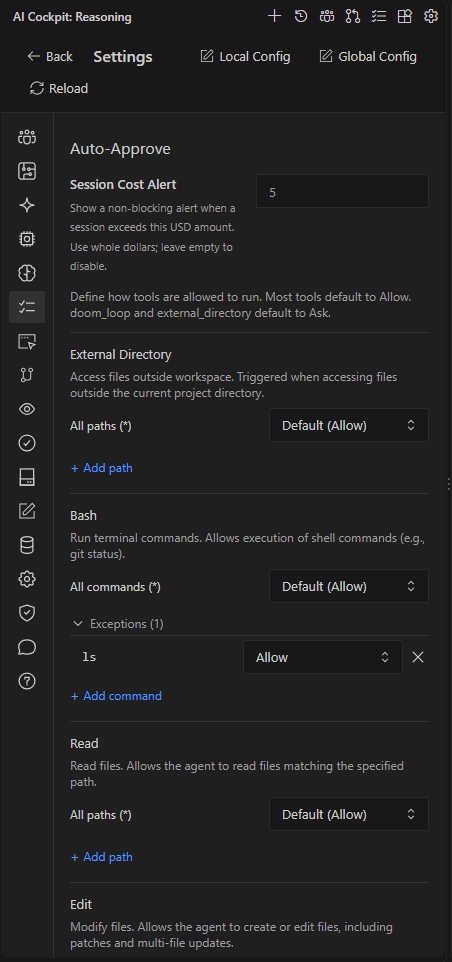
Each tool has a default decision and can have exceptions for specific paths or commands.
You can also save a rule directly from a permission request in Chat. See Respond to questions and permissions.
Approve everything for one session
The Enable auto-approve toggle below the prompt, or Ctrl+Alt+A (Cmd+Alt+A on macOS), approves every request that would otherwise ask. Deny rules still apply. See Auto Model and Auto Approval.
Use the sandbox when available
Settings → Sandboxing appears only in supported environments. The sandbox runs the agent's shell commands inside an operating-system sandbox that limits writes to the project and AI Cockpit's own folders.
| Setting | Effect |
|---|---|
| Sandbox | Turns the sandbox on. |
| Restrict Network Access | Blocks direct outbound access from commands and HTTP tools. MCP tools are unavailable while it is on. Model provider traffic is not affected. |
| Allowed Network Destinations | Hosts and ports commands can still reach, for example github.com:443 and api.github.com:443 for the GitHub CLI and HTTPS Git. |
| Additional Writable Paths | Extra folders commands can write to, such as /tmp. |
Type /sandbox in Chat to turn the sandbox on or off for the current work.
A permission decides whether the agent may try an operation; the sandbox limits what an allowed command can affect. Use both together. When a command needs to leave the sandbox, Reasoning always asks, even with auto-approve on.