Configure Context and Project Memory
Use Settings → Context to control how sessions handle long context and what Reasoning remembers about a project. Add task-specific files, folders, terminal output, Git changes, and images directly in the Chat prompt instead; see Add context and attachments.
Compaction
The Compaction settings decide when a long session is summarized so work can continue: Auto Compaction, Auto Compaction Limit, Auto Compaction Token Limit (pre-release), and Prune Old Outputs. See Keep long sessions healthy for what each one does.
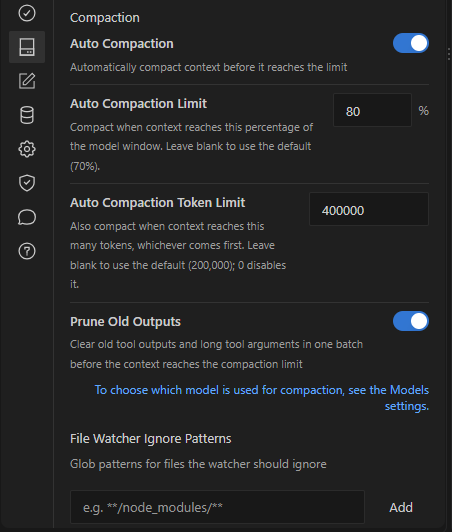
Compaction settings in Settings → Context. This capture comes from a pre-release build.
Ignore files in the watcher
Under File Watcher Ignore Patterns (pre-release), add glob patterns such as **/node_modules/** for files Reasoning should not watch for changes. Use it for large generated or dependency folders.
Project memory
Project memory keeps durable facts about a project, such as conventions, decisions, and corrections, and makes them available across sessions in the same project.
- Open Settings → Context.
- Under Memory, turn on Project memory for the current project.
- Turn on Auto-save project memory to save durable facts from completed turns automatically, or leave it off to save only what you ask for.
Storage and Memory index show where the memory is kept and the state of its search index.
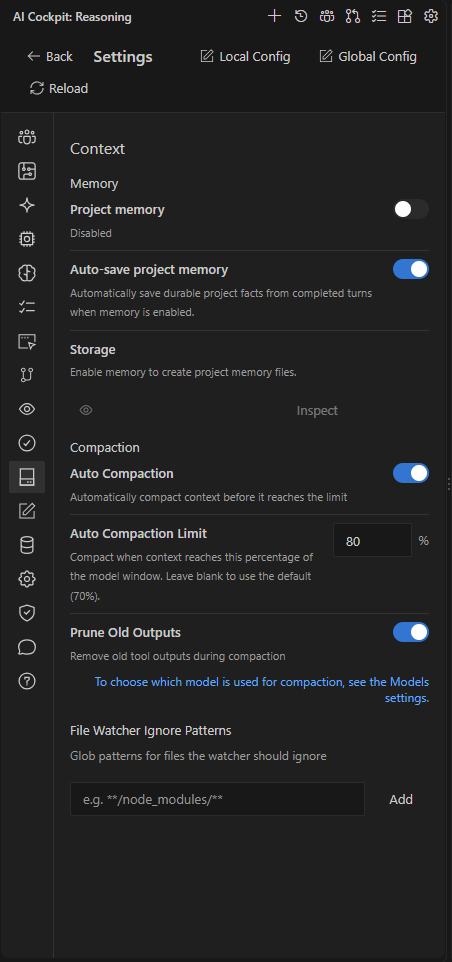
Settings → Context groups project memory and compaction.
You can also run AI Cockpit: Show Project Memory to inspect what is stored, or AI Cockpit: Toggle Project Memory to turn it on or off.
Manage memory from Chat
Type /memory in Chat to see the memory commands:
| Command | Result |
|---|---|
/memory status | Show whether memory is on and its state. |
/memory show | Show the stored project memory. |
/memory remember | Save a note to project memory. |
/memory correct | Save a correction. |
/memory forget | Remove matching memory. |
/memory on / /memory off | Turn project memory on or off. |
/memory auto on / /memory auto off | Turn automatic saving on or off. |
/memory inspect | Reveal the memory folder. |
/memory rebuild | Rebuild the memory index. |
/memory purge confirm | Delete all project memory files. |
Review remembered information before relying on it, and correct or remove facts that no longer match the repository.
Project memory is not the same as a Chat transcript. History resumes one conversation; project memory carries selected knowledge across conversations.