Add Context to a Reasoning Session
Attach the smallest set of information that lets the agent understand and verify the request.
Mention files and folders
Type @ in the prompt and start typing a file or folder name from the current project. Select a result to add it to the request.
Use a file when the task concerns a known implementation. Use a folder when the agent needs to discover relationships in a focused part of the project. Avoid attaching the whole repository when a smaller scope is enough.
To attach a file outside the workspace, type @ and select Browse files....
The file open in the editor can be offered as context automatically. Select Include active file to add it, or remove it from the prompt when it is unrelated.
Mention other context
The @ menu also offers:
| Mention | Adds |
|---|---|
| Terminal | The output of the active terminal. |
| Git changes | The current session or worktree changes. Shown in Git repositories. |
| Past chats | A previous session, found by searching your history. |
| Worktrees | An Agent Manager worktree. Shown when worktrees exist. |
| Model | A model reference, so the agent can assign it to subagents. |
Explain what you expect the agent to do with the context. For terminal output, say which command produced it and what you expected to happen.
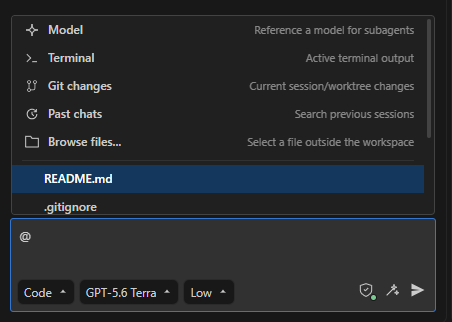
Type @ to open the context menu.
Add context from the editor
- Select code and run AI Cockpit: Add to Context, or press Ctrl+K then Ctrl+A (Cmd+K then Cmd+A on macOS). The selection is added with its file location.
- Run AI Cockpit: Add Terminal Content to Context from the terminal context menu.
- Drag an editor tab, an Agent Manager worktree, a session tab, or a terminal onto the prompt to mention it.
Large selections and pasted text are collapsed in the prompt so the request stays readable.
Attach images and PDFs
Paste or drop a PNG, JPEG, GIF, or WebP image, or a PDF, onto the prompt. The selected model must support that kind of input.
Check the request
Before sending, confirm that every attachment belongs to the task and that no credentials, customer data, or unrelated output are included. Context helps the agent work precisely, but it also uses the model's context window.