Keep Long Sessions Healthy
Long sessions accumulate messages and tool output until they approach the model's context window. Reasoning compacts them automatically, but a few settings and habits keep long work fast, affordable, and accurate.
Watch context use
The session header shows how much of the model's context the session uses, along with tokens and cost. Select it to open View context usage, which lists the Context Limit, input, output, reasoning, and cache tokens, and the Session cost.
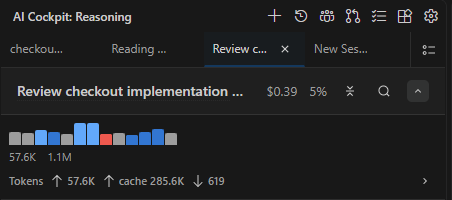
The session header shows cost, context use, and tokens.
Let compaction work
Compaction summarizes earlier conversation so the session can continue with less context. Configure it in Settings → Context:
| Setting | Effect |
|---|---|
| Auto Compaction | Compacts automatically before the context reaches the limit. |
| Auto Compaction Limit | Percentage of the model window that triggers compaction. Leave blank for the default, 70%. Set 100 to compact only when the context is nearly full. |
| Auto Compaction Token Limit (pre-release) | Also compacts at this number of tokens, whichever comes first. Leave blank for the default, 200,000; 0 turns it off. |
| Prune Old Outputs | Clears old tool outputs and long tool arguments before the context reaches the compaction limit. |
To compact at any moment, type /compact. To use a cheaper or faster model for summaries, set the Compaction model in Settings → Models.
After compaction, check that important decisions and constraints still appear in the summary. Restate them in your next message if needed.
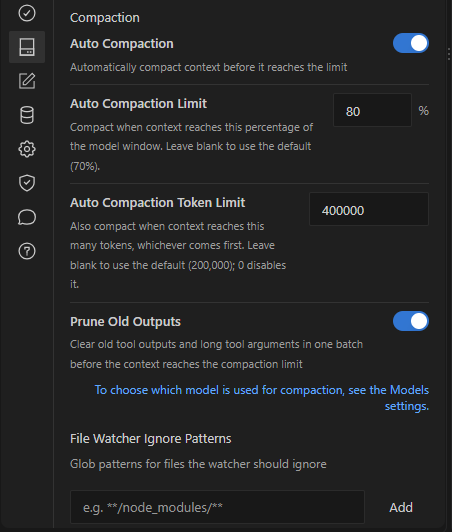
Compaction settings in Settings → Context. This capture comes from a pre-release build.
Follow retries and compaction
When a model request fails and is retried, or when the session is compacting, the transcript shows the progress instead of going silent. Tool failures that the agent recovered from appear as short rows; expand them for the technical details.
Get a cost alert
Open Settings → Auto-Approve and set Session Cost Alert to an amount in whole US dollars. Reasoning shows a non-blocking alert when a session exceeds that amount. Leave it empty to turn the alert off.
Start fresh when the topic changes
Continue a session while the next request depends on its context. When the work moves to an unrelated topic, start a new session with /new, or use Fork to new session on a message to branch from a known good point. See Use Chat.